Podcast Soundboard
Desktop Changelog (Windows & Mac)
A license key or active cloud subscription is required to activate the Windows app. The Mac app must be purchased through the Mac app store.
2.18.2 [20/6/2026]
- Upgrade versions of underlying libraries for stability.
- Ship universal Mac build instead of Rosetta.
- Stopped the web link from redirecting the desktop app to a webpage.
2.18.1 [10/9/2025]
- Dragging existing sound file onto soundboard now creates sound pad instead of only giving error.
2.18.0 [6/7/2025]
- Sound files management page now allows multiple files to be selected and imported at once.
- Auto focus on text field when new soundboard modal opens. Hitting enter while typing a name will submit the form.
2.17.0 [3/4/2025]
- Fixed output device not being remembered until settings was navigated to.
- Add new color picker to edit pad modal, allows both selection from predefined color palette and custom colors.
- Add new color pickers to edit soundboard modal, these allow you to set the background color for your soundboard, with individual colors for dark and light mode.
- Pad now has progress bar slider that enables seeking in track.
2.16.2 [27/1/2025]
- Fix bug when opening soundpad settings window in keyboard mode for key bind
/. - Add button above soundboard to display a search bar.
2.16.1 [01/11/2024]
- Don't show coloured background behind text on soundpad unless as background image is selected. Text no longer bold. Text 10% larger.
2.16.0 [23/10/2024]
- You can now select an image to show on the sound pad. Find the new option in the pad settings window.
- Fixed volume indicator not updating live.
- Minor stylistic changes to soundboard page.
2.15.0 [21/10/24]
- Master volume is no longer included in the volume indicator shown on sound pads.
- Sound files are now sorted by filename.
- Add ability to clone soundboards from soundboard management page.
- Add ability to re-order soundboards from soundboard management page.
- Minor UI changes in soundboard playback and soundboard management views.
- Fix bug where sounds won't load if they come after a sound that failed to load and soundboard is set to not load all sounds at once.
2.14.1 [7/10/2024]
- Address bug in MacOS app from app store that causes sound files to sometimes not load when first opened.
2.14.0 [15/9/2024]
- Add master volume slider to side of soundboard page.
- New layout for settings page.
- Changes to UI layout and buttons throughout.
- Improve how sounds are loaded into memory to be more reliable going forward.
- Change buttons in soundboard top bar to be less obtrusive, and add labels. Move dark mode, audio output device, and MIDI device settings from soundboard top bar to settings page.
- Fix typo in edit pad settings modal tab labels.
- Improve scrolling behaviour across all pages (header now stayed fixed in place).
- Change icons in sidebar.
2.13.12 [7/7/2024]
- A first pass on making the application accessible by screen readers.
2.13.11 [31/5/2024]
- Add loading indicator to import soundboard file button.
2.13.10 [2/5/2024]
- Fix signing in after session expired.
- Fix networking after downloading from Mac app store.
2.13.9 [28/4/2024]
- Fix sound file picker not immediately selecting new sound (had to select from dropdown after system dialog).
- Fix can't import sounds from sounds management page.
2.13.8 [27/4/2024]
- Fix bug opening file picker dialog on MacOS.
2.13.7 [20/4/2024]
- Don't flash "Select Sound Files Directory" on app launch when sound files directory already chosen.
2.13.6 [20/4/2024]
- Only allow letters and numbers for keyboard shortcuts.
- Minor UI tweaks to edit sound settings modal.
2.13.5 [20/4/2024]
- Prompt user to select sound files directory when they first open the app.
2.13.4 [14/4/2024]
- Windows builds now x64, should improve performance and reduce crashing.
2.13.3 [14/4/2024]
- Improve device buttons on help page.
- Don't flash license key page when opening app on MacOS.
2.13.2 [13/4/2024]
- Add signup form to app.
- Link to US version of MacOS app store.
- Add default pad color when importing web soundboard.
- Show loading indicator on pad when sound is loading.
2.13.1 [6/4/2024]
- Fix importing voicy files.
2.13.0 [31/3/2024]
- Being signed in to a web account allows the user to browse and import sounds from the Voicy sound library.
- Add the ability to sign in to a web account so that soundboards can be imported and exported between the desktop and web apps.
2.12.0 [17/3/2024]
- Support licenses purchased via <podcastsoundboard.com> instead of Gumroad.
2.11.1 [17/3/2024]
- Fix crash when loading memory monitor UI.
2.11.0 [14/3/2024]
- Various bugfixes and security improvements.
2.10.8 [1/2/2024]
- Remove dependency causing random crashes on launch.
2.10.7 [19/11/2023]
- Improve error handling in various places.
- Fix loop not applying automatically.
- Fix a crash importing soundboard objects with invalid JSON.
- Mitigated an error when sound in memory tries to perform volume/time assurances after pad is removed from global state.
- Mitigate an error swapping keyboard soundboard letters when letter is missing from global state.
- Improve crash reporting overall.
- Add developer tools to help with debugging.
- Fix zoom in/out missing in menu bar.
- Create new soundboard ID on ZIP import.
2.10.6 [23/9/2023]
- Fix bug with MacOS unable to read files from non-default directory.
2.10.5 [16/9/2023]
- Fix bug with sounds loading one-at-a-time in keyboard layout.
2.10.4 [16/9/2023]
- Add memory usage monitor in sidebar.
2.10.3 [16/9/2023]
- Improve directory relocation with limited permissions.
2.10.2 [14/9/2023]
- Fix bug with exported soundboards missing sound files when the sound name does not equal file name.
- Fix bug sometimes not showing file missing warning.
2.10.1 [29/8/2023]
- Don't crash when trying to play uninitialized sound.
- Fix loading new sounds new soundboard.
2.10.0 [10/7/2023]
- Now load sounds one at a time by default. Add option in setting page to load all at once.
- Don't delete sounds from original location after moving sounds directory to a new folder (copy sounds instead of moving them).
- Support adding multiple sounds at once by dragging and dropping into empty space on freeform soundboard.
2.9.3 [19/5/2023]
- Fixed missing-file warnings being shown for files with non-lowercase file extensions.
2.9.2 [19/5/2023]
- Fixed "Clear" button in edit-pad modal removing the letter from a pad. If a letter was missing before, it will be restored in this version.
2.9.1 [13/5/2023]
- Added ability to zoom in/out using ctrl/cmd +/-, or from menu bar.
2.9.0 [24/4/2023]
- Support customizing sounds directory and moving sound directory.
- Support exporting and importing .soundboard.zip files, which include sound files.
2.8.2 (hotfix) [6/5/2023]
- Fix soundboard export.
2.8.1 [16/4/2023]
- Change default soundboard volume to 1 from 0.8.
- Fix pause all sounds not working for sounds with fade out.
- Don't continue loading license popup on fail to verify.
2.8.1 [16/4/2023]
- Change default soundboard volume to 1 from 0.8.
- Fix pause all sounds not working for sounds with fade out.
- Don't continue loading license popup on fail to verify.
2.8.0 [27/3/2023]
- Add support for soundboard to be freeform like web, instead of strictly based on keyboard layout. New soundboards will have "freeform" layout type by default, but "keyboard" layout type is still available.
- Add ability to reorder sounds. On freeform soundboards this inserts the pad to the new position, while in keyboard mode the two pads are switched.
- Improve help page.
- Automatically unfocus soundboard search field.
- Fix various bugs from refactor to Typescript.
2.7.4 [26/3/2023]
- Add option for wide keyboard layout (10 keys instead of 8).
2.7.3 [4/3/2023]
- Fixed crash on M1 Macs caused by packaging AMD build with ARM build. This release will run x64 build in Rosetta.
2.7.2 [26/2/2023]
- Hide links to other platforms to comply with Mac app store policies (monopolistic practices).
2.7.1 [12/2/2023]
- Version bump purely for Mac app store reasons.
2.7.0 [12/2/2023]
-
Fixed memory leak caused by opening waveforms.
-
Add link to changelog on help page.
-
Add links to other device versions of app.
-
Add buttons to switch between soundboards easier. Hide soundboard switching buttons/dropdown when there is only one soundboard.
-
Add "Hide unused keys" button.
-
Fix soundboard picker initially not showing soundboard name.
-
Fix audio crash on Windows 7 by version bumping underlying application framework (Electron) from v16.0.5 to v21.2.1.
-
Fix error handling when dragging and dropping zero files.
2.6.4 [18/10/2022]
-
Fixed waveform not loading for keys "," or ";".
-
Include sourcemaps for better crash reporting.
2.6.3 [8/9/2022]
- Fixed numerous MIDI issues. Sharps/flats were being ignored. When initially opening the application, sometimes the sounds would not register with MIDI controller because of the time it takes the MIDI controller to load. After pausing one sound, listeners for other sounds would be cleared.
2.6.2 [7/7/2022]
- Fix sound start/end time not resetting when dragging/dropping sound onto board.
2.6.1 [23/5/2022]
-
Don't show loader on sounds list when deleting sound so it doesn't flick back to top.
-
Fix edit pad modal showing an old sound after editing a sound then switching soundboards.
2.6.0 [4/4/222]
-
Add text fields for start/end picker and fade sliders.
-
Fade-out-on-pause is now triggered when pause is due to pausing all sounds or soundboard solo.
-
Looping audio will no longer fail to pause when a "fade-out-on-pause" is triggered close to the end (currently requires custom end time).
-
Don't repeatedly fade-in-on-play when looping (currently requires custom end time).
-
Fix multi-shot audio not looping properly.
-
Add padding to bottom of management pages to give space for toasts.
-
Smooth out volume levels when looping.
-
Fix fade-in-on-play not working properly first time with custom start time.
2.5.4
-
Fix app store language metadata.
-
Minor logic changes for stability.
2.5.3
- Auto fade-out improvement.
2.5.2 [30/3/2022]
- Fix looping fade bug.
2.5.1 [30/3/2022]
-
Fix a typo in volume slider.
-
Minor optimisations.
2.5.0 [29/3/2022]
-
It is now possible to configure a sound fade-out on pause, and fade-in on play. An auto-fade-in option is also added to correspond to the existing auto-fade-out feature.
-
It is now possible to clear the track for a pad without resetting the entire pad.
-
Pad's current volume is now shown beneath progress bar. This factors in master volume, soundboard volume, pad volume, duck effect, and any fades.
2.4.0 [28/3/2022]
-
Volume for sound updates without hitting "save" on modal.
-
Some performance optimisations to reduce minor audio glitches when editing sounds.
2.3.0 [28/3/2022]
-
Add clear button to edit pad modal.
-
Fix error deleting files on MacOS.
-
Remove a synchronous operation that could potentially introduce audio glitches.
-
Fix link to contact form.
2.2.1 [21/3/2022]
- Fix bug when creating soundboard.
2.2.0
-
Add auto-update.
-
Add codesigning.
-
Fix volume of sound being wrong for a split second when sound starts playing.
-
Pause all sounds when spacebar is pressed (feature was inadvertently removed in v2.0.0).
2.1.3 [16/3/2022]
- Fix app showing that it is available in more languages than it is.
2.1.2 [9/3/2022]
- Fix always looping when there is an endTime.
2.1.1
- Fix MAS complaints to do with menu bar.
2.1.0
-
Added global settings page with master volume slider.
-
Added more tooltips.
-
Fixed a variety of bugs, some critical, such as keyboard shortcuts only working with capital letters.
-
Fix pause button having wrong tooltip label.
-
Audio duration now in mins/secs.
-
Pad name now wraps so full name can be seen.
-
Size of buttons increased.
-
"Duck amount" is now global slider on global settings page.
2.0.0 [8/3/2022]
This is the first major reworking of Podcast Soundboard. It primarily features a significant visual improvement over the last version to match the new web version.
There are some notable breaking changes that you need to be aware of when you install this version of the app:
-
Please take the time to familiarize yourself with the new user interface. Some symbols in the app have changed, hover over them to see their labels.
-
I have removed the "Always reset to start" option since it filled the same purpose as the "Always play from start" option. You may need to update your pad settings accordingly.
-
Volume sliders now require you to hit "Save" before they're applied to sounds.
Desktop App
Podcast Soundboard for Windows
Podcast Soundboard for Windows is the perfect soundbite and track playing tool for those who need something offline.
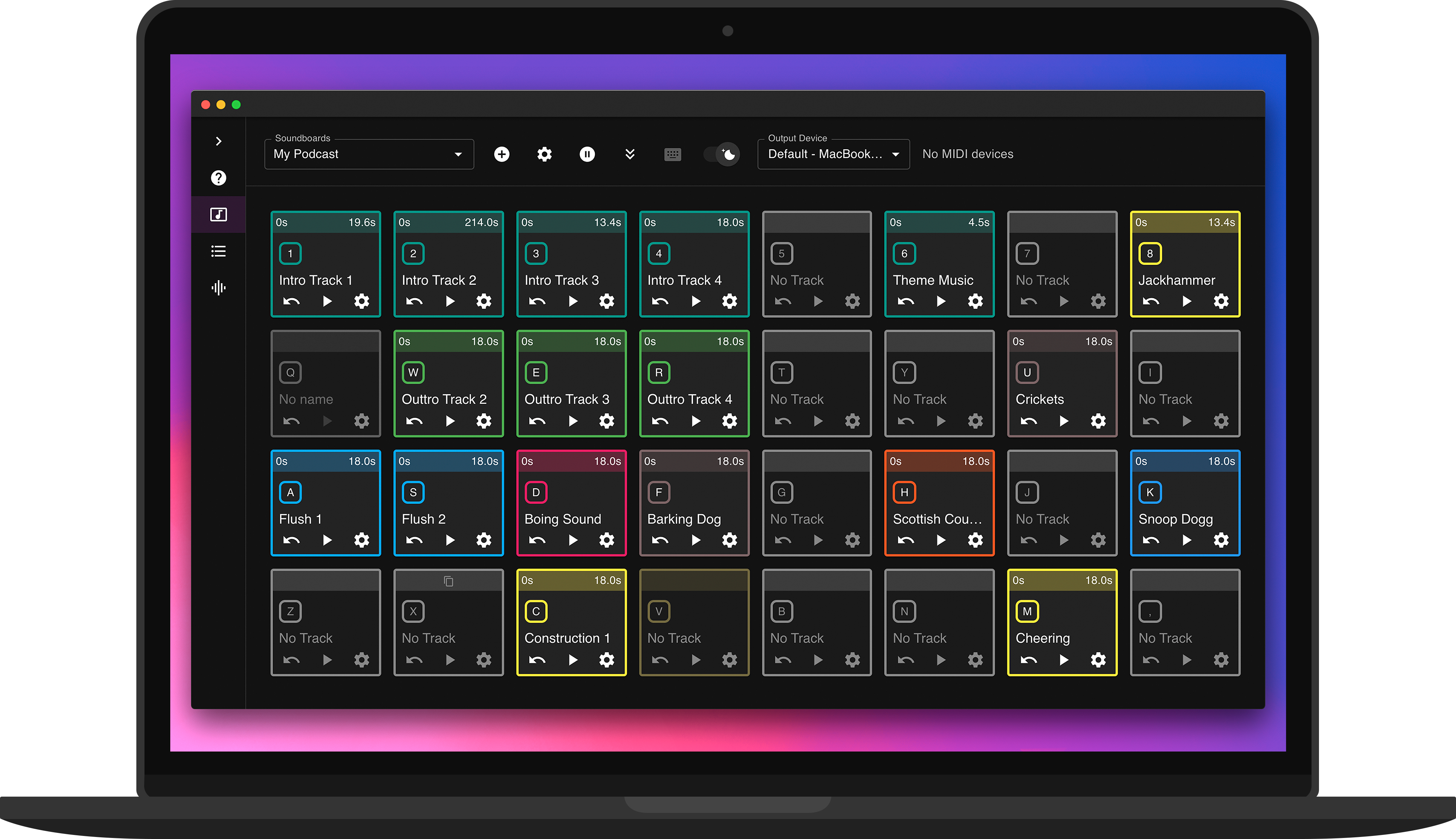
Bring every moment to life with sound
Your custom soundboard for events and shows
1
2
C3
The ultimate soundboard
Create, control, and customize sounds to elevate every performance. Try it for free on web, iOS, and Android.
We're always open to feedback and collaboration. Reach out!
Available on all devices
Thousands of happy users
With nearly a decade of customer collaboration, we've crafted an unbeatable user experience with a powerful feature set. Try Podcast Soundboard today, backed by our money-back guarantee.
-_Frustraded
For anyone doing radio shows/podcasts and you need to quickly and effectively trigger tracks and audio effects, this program is fantastic - I have been doing a radio show for 8 years and since discovering Podcast Soundboard it has become an essential part of my show.

Jos
Wow! 🤩 This app is really cool. I was looking for a soundboard for my podcast, and I got this jewel for my android phone, my iPad and my PC. There are another options in the market, but they are so expensive. This is a great tool and it could be a big competitor. Best option? Absolutely!!! [...]
bxharvey
In my point of view, this is the best sound board app I've seen so far. Multi-platform is a must for me! Support is just great!!
Premium software at an affordable price
Find Podcast Soundboard for free on the iOS app store and Android Play store. We also have premium desktop versions at an affordable price for a lifetime license. If you want to try the app from your browser, make a free account!
Web
From $2.95/mo
Create an account to try the web version for free. Upgrade to an affordable premium subscription for unlimited sounds, and bonus access to the Windows app.
MacOS
$14.99
Podcast Soundboard is the leading soundboard application on the MacOS app store. Perfect for MIDI and offline support.

Windows
$14.95
Purchase a lifetime license for Podcast Soundboard for Windows directly from our website. Alternatively, access to the Windows app is included with a web subscription.
Unbeatable features
Customize your soundboard entirely to your needs. We're always adding new features. If you have any ideas, reach out!
Sound Galleries
Dive into an endless sea of sounds with Freesound and Voicy. Discover, play, and integrate unique sounds effortlessly.
Web Soundboards
Seamless access across all versions. Store your soundboards online and download them to any device.
Trim Tracks
Precision editing made easy. Trim your audio tracks to ensure your projects sound exactly the way you want.
Color Controls
Add a splash of color to your projects. Our color controls let you set the mood and style of your soundboards, making them uniquely yours.
Advanced Fade Controls
Craft the perfect entrance and exit for your audio with advanced fade controls. Elevate your sound design with smooth transitions.
Image Upload
Find your sounds at a glance by uploading a custom image to represent your track.
Volume Control
Master your audio levels with precise volume control at a sound, soundboard, or global level.
Loop & Multi-fire
Choose to loop tracks like background music, or enable Multi-Fire to layer copies of the same sound effect.
Duck Volume
Seamlessly lower the volume of all tracks with the click of a button. Perfect for podcasts and narrations, ensuring your voice is always heard clearly.
AI-generated Soundboards
Effortlessly curate a set of sounds using AI-generated soundboards. Create fresh soundscapes in seconds, perfect for enhancing your projects or just having fun.
Keyboard Shortcuts
Your sounds are at your fingertips with customizable keyboard shortcuts.
MIDI Support
Connect your MIDI devices to play sounds with your favorite hardware seamlessly integrated into our platform.
Background Playback
Keep the music going, even when you switch apps. With background playback, your soundtrack never misses a beat.
Global Shortcuts
Trigger your audio without breaking your workflow. Global shortcuts let you play and pause tracks without ever having to switch windows.
Output Device Picker
Route app audio to a specific playback device of your choosing.
Search from a universe of clips
We integrate with the largest free sound libraries on the web.

Voicy is a user-driven library with over 500,000 trending clips and memes
Freesound offers more than 600,000 creative-commons sounds in every possible category.
Trusted by creators everywhere
Years of user-driven refinement have shaped Podcast Soundboard into the essential tool it is today.
🌏
Thousands of people use Podcast Soundboard in their creative projects.
Continually enhanced since 2017 thanks to engaged user feedback.
😌